Topical maps
PixelClaw toolsTopical Map Generator: Build a Topic Cluster From Your Keywords, Questions and Gaps
What a topical map is, how to build one that a blog can actually follow, and how PixelClaw's keywords, reader questions, ideas and competitor gaps supply the pieces.
On this page▸
A topical map generator plans every article a site needs to cover one subject thoroughly: a central guide, the questions around it, and the links between them. PixelClaw does not draw a map diagram; it builds the parts, from your keywords, the questions readers ask, topic ideas and competitor gaps, and queues them as a cluster.
What a topical map is, and what a generator should give you
A topical map is a plan for covering one subject completely. At its centre is a pillar: the broad guide. Around it are the specific questions people ask, each answered by its own article. Lines between them are the internal links that tie the cluster together.
The point is coverage. A site with one article on a subject is a site with an opinion. A site with thirty interlinked articles answering every question about it looks, to readers and to search engines, like the place to go for that subject.
So what you want from a topical map generator is not a pretty diagram. It is a list of articles you will actually write, with real demand behind each, grouped into clusters, in an order that makes sense.
How PixelClaw supplies the pieces of a topical map
PixelClaw does not draw the map; it supplies everything a map is made of. The Keywords tab holds your target phrases, with approximate monthly searches when you look them up (each lookup is paid once and reused free for 30 days) and, once Google Search Console is connected, where your blog stands for each.
Questions to explore lists the questions readers ask around your topics, with the source each one came from, so you can turn the good ones into articles or FAQ answers. Ideas, on the Research page, suggests and scores topics from your business profile. And on plans with competitor gaps, the Competitors tab finds searches your competitors rank for that none of your posts cover.
Together, those are the raw material: demand, questions, ideas and gaps.
Building the map, step by step
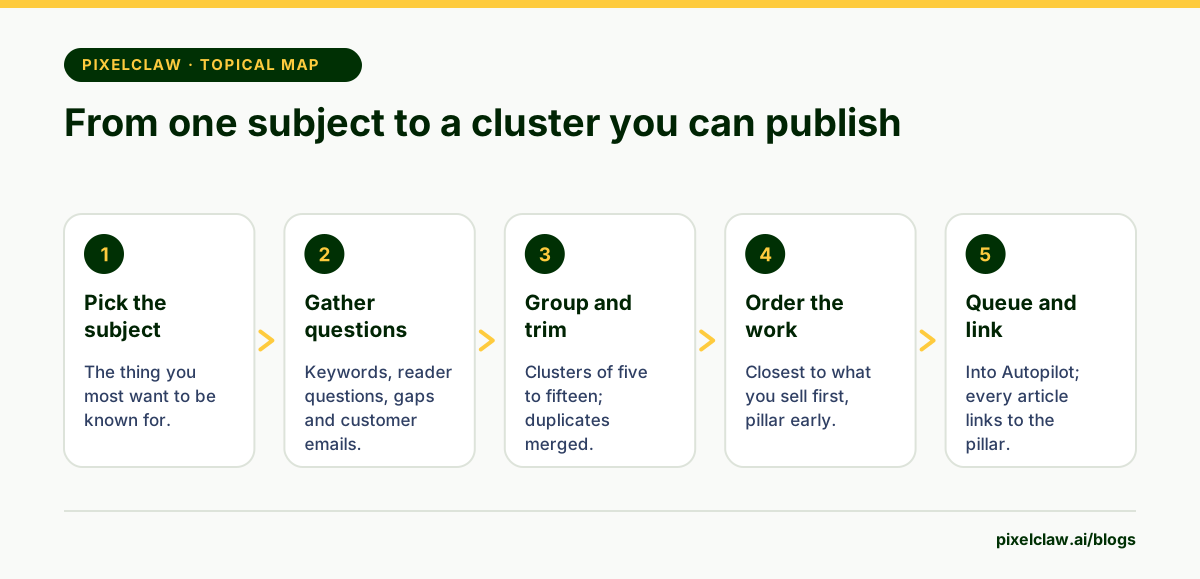
Start with the subject your business most wants to be known for, and write the pillar's question: the broad one, such as "How to choose a heat pump". Then collect every narrower question you can find: from your keyword list, from the questions to explore, from competitor gaps and from your own customers.
Group the narrow questions into clusters of five to fifteen. Drop duplicates, and merge questions that one article could answer well together. Mark which cluster to build first: usually the one closest to what you sell.
Ordering the articles and linking them
Publish the pillar early, even if it gets better later, so every new article has something to link to. Then work outward through the cluster, closest to buying first: comparisons, costs and how-tos before history and background.
Link every article to the pillar and the pillar to every article. Link closely related articles to each other with anchor text that names the other page's subject. PixelClaw's score checks that each post links to at least two related posts, and a one-click fix adds them.
Turning the map into published posts
A map only helps once it is written. Paste the cluster's questions into Autopilot, up to 50 at a time, set the pace, and let it write them at a steady rate. In approval mode you read each one before it goes live.
Autopilot can also keep the map growing: its topic sources refill the queue from saved keywords and research ideas that no post covers yet. For the bulk side in detail, read how to generate articles in bulk.
Measuring a topical map once it is live
Measure the cluster, not just each post. In Search Console's performance report, filter by the cluster's pages and watch total impressions over a few months. A healthy cluster's impressions rise as articles are added and linked, often before any single post ranks highly.
Look for the gaps the data shows: queries your cluster appears for that no article answers directly. Those are the next articles on the map.
Common topical map mistakes
The first is mapping too wide. A map with three hundred articles across ten subjects never gets finished; a map with twenty articles on one subject does, and starts paying off. The second is mapping keywords instead of questions, which produces articles that overlap and compete with each other.
The third is never linking the map. Articles written from a topical map but published without links between them behave like scattered posts, and lose most of the benefit. Decide the links as part of the map, and check them when each article goes live.
- A topical map is a plan for covering one subject fully: a pillar, the questions around it and the links between them.
- The useful output is a list of articles you will actually write, not a diagram.
- PixelClaw supplies the pieces: saved keywords, search volumes, reader questions, topic ideas and competitor gaps.
- Build one cluster at a time, link it tightly, and finish it before starting the next.
- Queue a finished map into Autopilot so it gets written at a steady pace.
Frequently Asked Questions
Does PixelClaw draw a topical map diagram?+
No. It gives you the material a map is built from (keywords with search volumes, the questions readers ask, scored topic ideas and competitor gaps) and lets you queue the resulting cluster as articles. A spreadsheet or whiteboard is enough for the map itself.
How many articles should a topical map have?+
Enough to answer every real question about the subject and no more. For a focused business topic that is often ten to thirty articles; a broad subject can need more, built cluster by cluster.
What is topical authority?+
A widely used SEO term for a site being seen as a reliable source on a subject because it covers it thoroughly and consistently. Google does not publish a topical authority score, but complete, well-linked coverage helps both readers and search engines.
Should every article in a cluster link to the pillar?+
Yes, and the pillar should link to each of them. Add links between closely related articles too, using anchor text that says what the other page covers.
Sources
- Search Engine Optimization (SEO) Starter Guide — Google Search Central
- Performance report (Search Console Help) — Google
Built & scored using PixelClaw.ai
More from this blog
Continue exploring autoblogging architecture, AI blog writing, and SEO / AEO / GEO playbooks.

An AI SEO Tool for Content: From Keywords and Competitors to Indexed Posts
What PixelClaw does as an AI SEO tool across the whole content cycle: keyword research and tracking, competitor gaps, writing, scoring and indexing, and what it leaves to other tools.
PixelClaw Editorial Team
Product and search team
How to Generate Articles in Bulk With AI, From Keyword List to Published Posts
A seven-step process for turning a keyword list into a batch of articles that rank: clusters first, questions second, a careful first batch, then a steady publishing pace.
PixelClaw Editorial Team
Product and search team

SEO Blogs That Earn Clicks in 2026: How to Plan, Write and Publish Them
The on-page checklist, the length question, internal links and the technical basics, written for people who want their blog posts found rather than admired.
PixelClaw Editorial Team
Product and search team