Automated blog writing
PixelClaw toolsAutomated Blog Writing, Explained Step by Step With a Real Pipeline
What actually happens inside automated blog writing, from the moment a topic leaves the queue to the moment a post goes live, and the design choices that keep it reliable.

On this page▸
Automated blog writing is software that takes topics from a queue and produces finished blog posts on a schedule without a person starting each one. A reliable pipeline researches, outlines, drafts, illustrates and scores every post, writes it ahead of its publishing slot, retries failures and holds weak posts back for review.
Automated blog writing is a pipeline, not a prompt
The simplest automated blog writing is a script that sends a prompt to a model every morning and posts whatever comes back. It works until the day the model returns half an article, an empty answer or a confident factual error, and then it publishes that too.
A dependable system splits the work into stages that can each be checked, retried and logged. If research fails, the draft never starts. If the image fails, the post goes ahead without one and says why. If the score is low, nothing is published without a person. That is the difference between automation and a liability.
The stages of PixelClaw's automated blog writing
Each post moves through the same stages, and the Autopilot page shows where each one is.
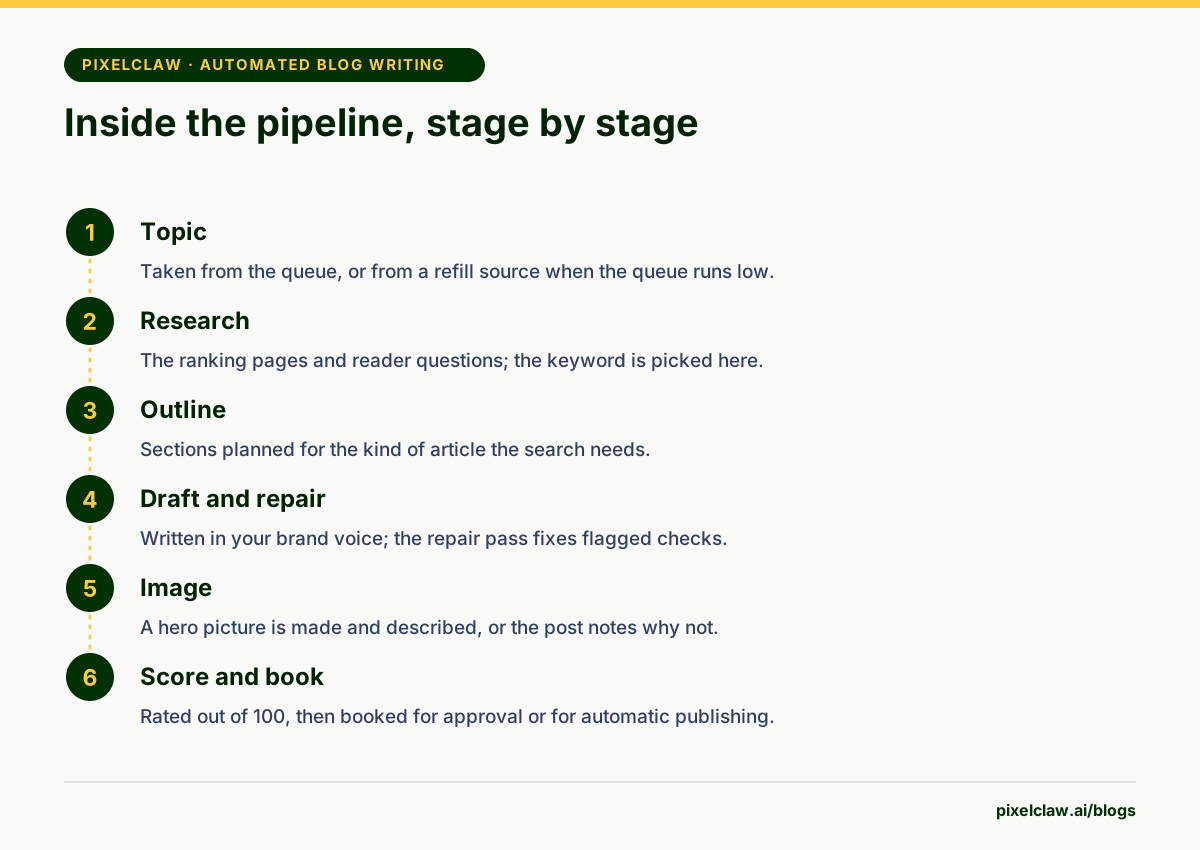
Topic: the next item leaves the queue, or a refill source supplies one. Research: the ranking pages and reader questions are read, and the keyword is chosen. Outline: the sections are planned for the kind of article the search needs. Draft: written in the chosen brand voice, then a repair pass fixes what the score flags. Image: a hero picture is made and described. Score: the post is rated out of 100. Then it is either booked for approval or, in publish mode, scheduled to go live if it scored 77 or more.
Why posts are written a day ahead
Autopilot starts each post about 24 hours before its publishing slot. Writing takes minutes, so the head start is not about speed. It buys two things.
Room to recover: if a provider is down or slow, there is time to retry before the slot, instead of missing it or publishing something incomplete. And room to review: in approval mode the finished post sits in your list a day before it is due, which turns approval into a calm daily habit rather than a rush.
How failures are handled
Automated blog writing fails in two different ways, and treating them the same is a classic mistake. A failure on the platform's side, such as a provider timing out, is temporary; the right response is to wait and retry. A failure on your side, such as an expired API key or a blocked research site, will happen again every time until someone fixes it.
PixelClaw separates the two. Platform failures retry after 5, 15 and 30 minutes while more than two hours remain before the slot, without redoing stages that already finished. Repeated failures on your side pause Autopilot with a plain explanation, instead of failing quietly every night.
People first, automation second
Automated work should never get in the way of a person waiting at a screen. In PixelClaw's job queue, work started by people, in the editor or through the API, runs first. Autopilot's scheduled posts come next, then other automatic background work.
So when you click Write draft at the same moment Autopilot is filling next week's queue, your draft does not wait behind it.
Limits that keep automated writing healthy
Two limits matter most. A quality bar: posts go live on their own only at a score of 77 or more, and everything else waits for a person. And a pace cap: each plan sets posts a week per blog, and no blog ever passes 14, because Google's spam policies target sites that publish lots of pages mainly to rank.
Credits are a third, gentler limit. When they run out, Autopilot waits rather than failing half-way through a post. To set all of this up, follow how to automate blog content.
What you see while automated writing runs
Automation you cannot see is automation you cannot trust. Autopilot's page lists every run, the stage it has reached and, when a stage could not finish, a plain reason. Finished posts appear in your posts list like any other, marked as waiting for approval or booked to publish.
Progress emails can tell you when a draft is ready, when a step could not finish and when credits run low, so you do not need to keep the page open. Owners and admins can switch Autopilot off at any time; the queue then waits, untouched, until it is switched back on.
That visibility is what makes it reasonable to let automated blog writing publish on its own. You are not trusting a black box; you are checking a log once a week.
- Automated blog writing is a pipeline of stages, and each stage can fail on its own.
- Writing each post a day before its slot leaves room for retries and for a person to read it.
- Failures on the platform's side are retried; repeated failures on yours pause the pipeline.
- People always come first: work you start by hand runs before scheduled work.
- A quality bar and a weekly pace cap stop automation from publishing weak or excessive content.
Frequently Asked Questions
How long does automated blog writing take per post?+
Minutes of processing per post. PixelClaw starts each scheduled post about a day before it is due, which is not because writing is slow but because it leaves time for retries and review.
What happens if the AI provider is down?+
Autopilot retries after 5, 15 and 30 minutes while there is time before the slot, without repeating stages that already finished. If it still cannot finish, the post is not published half-made.
Can automated blog writing run on multiple blogs?+
Yes. Each blog has its own Autopilot, queue and schedule. Pro covers three blogs under one account, sharing its credits.
Does automated writing still need an editor?+
A light one. The pipeline handles structure and mechanics; a person should still read a sample each week, clear anything held for review, and check facts that matter.
Sources
- Spam policies for Google web search — Google Search Central
- Creating helpful, reliable, people-first content — Google Search Central
Built & scored using PixelClaw.ai
More from this blog
Continue exploring autoblogging architecture, AI blog writing, and SEO / AEO / GEO playbooks.

How to Automate Blog Content Without Losing What Makes It Yours
Which steps of blogging to automate, which to keep human, and how to set up topic discovery, research, drafting, publishing and indexing so the blog runs while the judgment stays yours.
PixelClaw Editorial Team
Product and search team

Hands-Free Autoblogging: What Autopilot Can Run Alone, and Where You Still Step In
An honest look at hands-free autoblogging: what PixelClaw's Autopilot does without you, the safety rails that hold weak posts back, and the weekly hour that keeps it working.
PixelClaw Editorial Team
Product and search team

Autoblogging in 2026: How to Run a Blog That Publishes Itself and Still Ranks
What autoblogging looks like when it works: a topic queue, research before writing, a score that holds weak drafts back, and a pace Google reads as a publication rather than a content farm.
PixelClaw Editorial Team
Product and search team