How-to guide
How-to guideHow to Automate Blog Content Without Losing What Makes It Yours
Which steps of blogging to automate, which to keep human, and how to set up topic discovery, research, drafting, publishing and indexing so the blog runs while the judgment stays yours.

On this page▸
To automate blog content, automate the repeatable steps (topic finding, research, drafting, formatting, scheduling, indexing) and keep the judgment steps human: choosing what matters to customers, approving outlines, checking facts and adding experience. A queue, a quality score and an approval step make that split work week after week.
What to automate in blog content, and what to keep
Blogging is a dozen small jobs, and they are not equally worth your time. Some are pure mechanics: formatting headings, resizing images, writing alt text, updating the sitemap. Some are judgment: deciding which questions matter to your customers, and whether a claim is true.
The trick to automating blog content well is drawing that line on purpose. Automate everything mechanical, completely. Keep the judgment, but make it quick: approve an outline in a minute, check five facts in five minutes, add one real example per post.
Most teams get this backwards at first. They automate the judgment, letting a tool pick topics and publish whatever it writes, and keep doing the mechanics by hand, pasting drafts into a CMS and writing alt text one image at a time. That is the most tiring way to run a blog and produces the weakest posts. Flip it, and the same hours produce more and better content.
The table below is the split we recommend, and the one PixelClaw is built around.
| Job | Automate it? | Why |
|---|---|---|
| Finding topic ideas | Mostly | Research and competitor data find more than you would; you choose |
| Researching sources | Yes | Reading twenty pages is slow for people and fast for software |
| Outline | Draft it, then approve | The cheapest place to steer the post |
| First draft | Yes | Then read it |
| Facts, prices, claims | No | Only you can vouch for them |
| Images and alt text | Yes | Mechanical, and easy to forget |
| Schema, sitemap, indexing | Yes | Nobody should do this by hand |
| Refreshing old posts | Flag automatically, edit yourself | Data finds them; judgment fixes them |
Automate topic discovery
Running out of ideas is the most common reason blogs stop. Automating topic discovery fixes it at the source.
In PixelClaw, Research builds topic ideas from your business profile and scores them, the Keywords tab keeps your target phrases with approximate search volumes, and on plans with competitor gaps the Competitors tab finds searches your competitors rank for that none of your posts cover. Autopilot can draw from all of these when its queue runs low, so the blog never waits on someone having an idea.
You still choose. Topic sources fill the queue; you can remove anything that does not fit before it is written.
Automate research and drafting
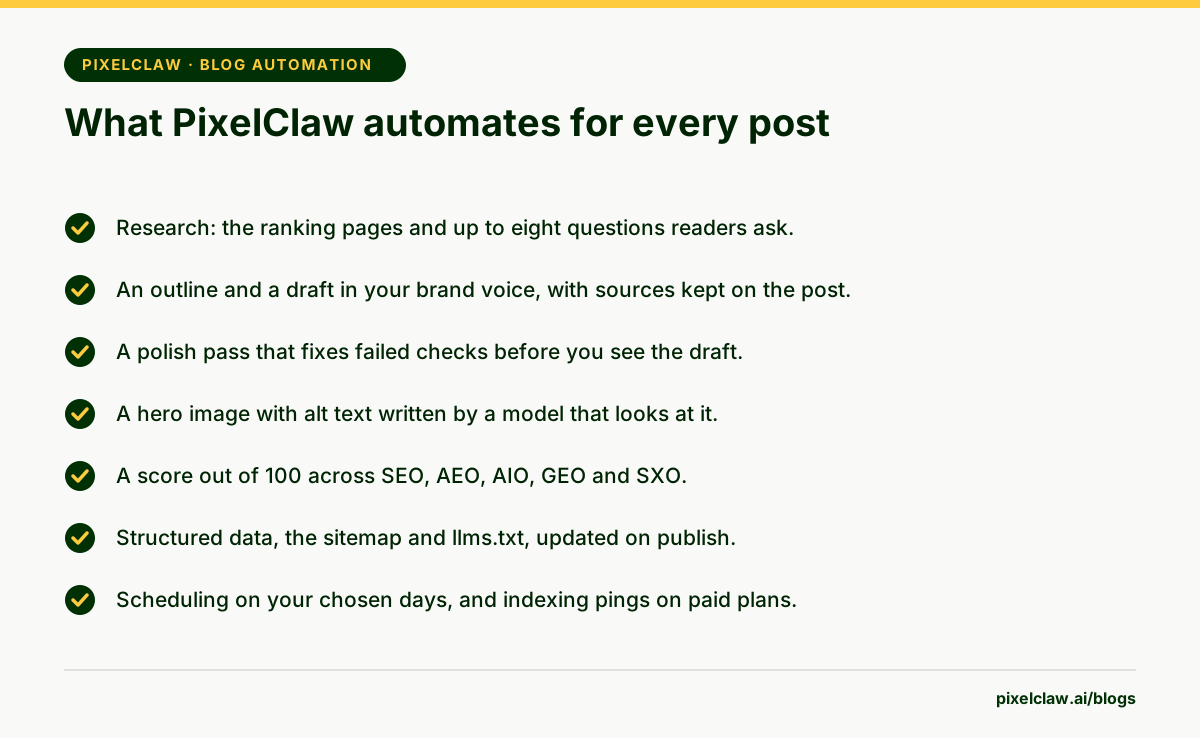
Research is where automation saves the most time and adds the most quality. For each topic, PixelClaw reads the pages that rank and collects up to eight questions readers ask, then plans the post from them. The sources stay attached to the post, so you can check them later.
Drafting follows the outline, in your brand voice, using your business profile for facts about your services. Before you see the draft, a polish pass scores it and fixes the small things that fail: the title, the description, the opening answer, a heading that should carry the keyword, key takeaways, the FAQ, a missing list, image descriptions. Nothing in that pass invents a source.
Automate the technical work completely
This part should involve no people at all. On a PixelClaw blog, every AI-written post gets a hero image with alt text, structured data for the article, its FAQ and its breadcrumbs, and a place in the blog's sitemap and llms.txt the moment it is published.
Paid plans also ping IndexNow on publish, which tells Bing and other participating engines about the new page straight away, and can send the sitemap to Google through Search Console. Every paid plan can also notify Google's Indexing API with your own Google Cloud key.
Automate scheduling and publishing
Choose how many posts a week and the days they go live, and let the schedule run. Autopilot writes each post about a day before its slot, so there is time to read it.
Then choose how much control to keep. In approval mode, every finished post waits for you and goes live at its booked time once approved. In automatic mode, posts scoring 77 or more that pass every publication check go live on their own, and anything weaker is held for review. Most blogs start with approval and switch once the drafts stop needing edits.
Keep the human checkpoints short and regular
The human part of an automated blog should take one or two hours a week, at a fixed time. Read a sample of the week's posts. Check any held for review. Look at Search Console for posts losing readers and refresh one or two.
The habit matters more than the hours. Automated blog content drifts slowly, and a weekly look catches drift while it is small. For a full walk-through of the tools that do this, see our guide to automated blog writing or hands-free autoblogging.
- Automate the mechanical steps; keep topic choice, fact checks and first-hand experience human.
- A topic queue with refill sources is what turns occasional posting into a steady blog.
- Images, alt text, structured data, sitemaps and indexing pings should never be manual work.
- An approval step and a quality score let you automate without losing control.
- Automation pays off only if you also refresh the posts that start losing readers.
Frequently Asked Questions
What is the first thing to automate on a blog?+
The technical chores: images, alt text, structured data, sitemaps and indexing pings. They take time on every post, add nothing creative and are easy to forget, so automating them improves every post at once without changing how it reads.
Can blog content be fully automated?+
Technically, yes. Whether it should be depends on how much you trust the drafts. Most businesses do best automating everything except a weekly review: reading a sample of posts, checking facts and handling anything the system held back.
What should never be automated?+
Decisions about what your business stands for, claims about prices or results you have not checked, and first-hand experience. An AI cannot add the story of your last project; only you can.
Does automated content hurt SEO?+
Not by itself. Google rewards helpful content however it is made and acts against content made mainly to manipulate rankings. Automated posts that answer real questions with sources and a sensible pace do well; mass-produced filler does not.
How much time does automating a blog save?+
Most of the drafting and formatting time. What remains is a weekly hour or two for choosing topics, reading posts and refreshing old ones, which is the part that decides whether the blog works.
Sources
- Creating helpful, reliable, people-first content — Google Search Central
- IndexNow documentation — IndexNow
- Build and submit a sitemap — Google Search Central
Built & scored using PixelClaw.ai
More from this blog
Continue exploring autoblogging architecture, AI blog writing, and SEO / AEO / GEO playbooks.

Automated Blog Writing, Explained Step by Step With a Real Pipeline
What actually happens inside automated blog writing, from the moment a topic leaves the queue to the moment a post goes live, and the design choices that keep it reliable.
PixelClaw Editorial Team
Product and search team

Hands-Free Autoblogging: What Autopilot Can Run Alone, and Where You Still Step In
An honest look at hands-free autoblogging: what PixelClaw's Autopilot does without you, the safety rails that hold weak posts back, and the weekly hour that keeps it working.
PixelClaw Editorial Team
Product and search team

How to Generate SEO Posts Automatically, and Keep Them Worth Reading
What an automatic SEO post generator must get right on every draft, how PixelClaw's polish pass fixes the gaps before you see it, and the checks that keep automatic posts useful.
PixelClaw Editorial Team
Product and search team