AI content generator
PixelClaw toolsAI Content Generator for Blogs: What It Makes, What It Checks, What It Costs
A plain account of PixelClaw as an AI content generator: the models it runs, how its credits and your own keys pay for the work, and the checks on everything it makes.

On this page▸
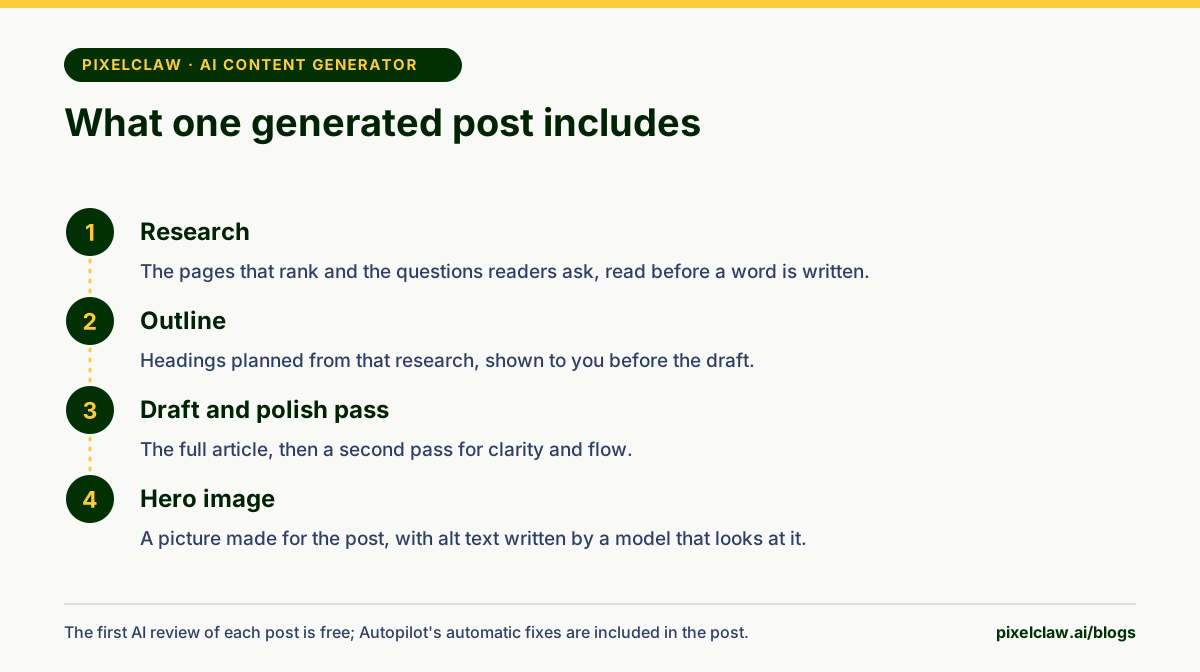
An AI content generator turns prompts or topics into written content. For blogs, PixelClaw generates complete posts: research, outline, draft and hero image, paid from your plan's credits or run on your own AI keys for no credits, and it scores every post before it can go live.
What PixelClaw generates, and what it doesn't
"AI content generator" covers everything from ad headlines to product descriptions to novels. PixelClaw is narrower on purpose: it generates blog content, and does it completely. A topic goes in; a researched, illustrated, structured and scored post comes out, on a blog that is already set up to be found.
It also generates the pieces around posts: topic ideas from your business profile, outlines, rewritten sections, one-click fixes for failed checks, hero images and other pictures, alt text, and translations into eleven more languages on paid plans.
It does not write ad copy, emails or social posts. If those are your main need, a general content generator is the better fit, and we compare those in the best AI content writers.
What it costs: your plan's credits or your own keys
PixelClaw pays for AI work from your plan's credits, and every price is shown in your dashboard before you start anything. A complete post's credits cover its research, outline, draft and hero image, and Billing lists what each smaller action uses once you sign up.
You can pick a stronger model for a post that deserves one. The model picker shows its price before you start, so one important post can get more care while the rest stay on the standard model.
Running it on your own AI keys
Connect your own key and the matching work runs on your account instead of using credits. An AI key from OpenAI, Anthropic, Google Gemini, DeepSeek, MiniMax, Kimi or OpenRouter covers writing. A Firecrawl key covers research lookups. An OpenAI or Google key covers images.
Own keys suit two kinds of user: busy blogs, where provider bills of a few cents per post cost less than credits, and teams that already pay for a model they prefer. Your plan still sets how many posts you keep, and bought credits pay for posts beyond it. You can also choose to use your plan's credits first and fall back to your own key once they run out.
The checks on everything it generates
Generating content is cheap. Generating content worth publishing is the hard part, which is why every PixelClaw post is scored before it can go live.
The score covers five areas: search engines, answer engines, trust signals, AI discovery and reader experience. Each failed check is explained in plain words with a fix. A post needs 60 or more to publish, and Autopilot publishes alone only at 77 or more. Before you even see a draft, a polish pass has fixed the small things that failed.
The score cannot tell whether a claim is true. Check the facts that matter yourself, especially prices, names and dates.
How much content each plan generates
The free plan includes 50 credits a month, enough for two complete posts, with no card needed. Starter, at $49.99 a month, includes 250 credits a month, and Pro, at $99.99, includes 1,000, plus three blogs and competitor gap research. Paid plans put no limit on the posts you keep; bought credits add more posts once the month's credits are used.
Plan credits renew each period. Credits you buy separately carry over until used, and they also let Autopilot run at up to 14 posts a week on any blog while they last. The pricing page lists every plan's limits.
Choosing a model, and when a stronger one is worth it
The standard writing model is the right default for most posts: it writes well, follows the house rules and costs the prices above. A stronger model can be worth it for posts that carry more weight, such as a pillar guide, a comparison that will be read by buyers, or a topic with subtle trade-offs.
The model picker shows each model's price relative to the standard one, so the cost of the upgrade is clear before you start. On paid plans, the included models reason before they rewrite a passage or a section, which tends to produce tighter edits. On your own key, you can use any model your provider offers, at your provider's price.
A practical approach: write most posts on the standard model, spend a stronger model on the five or ten posts that matter most each quarter, and judge the difference by results in Search Console rather than by feel.
Comparing AI content generator costs fairly
Prices per article are hard to compare across tools because each one counts differently: credits, words, articles or seats. A fair comparison asks three questions. What does one finished, publishable post cost, including research and an image? How much editing does it need afterwards? And what else do you need to buy to publish it, such as hosting, an SEO plugin or an image tool?
On those terms, a tool that looks cheap per article can cost more per post you actually publish. We work through the numbers across several tools in the cheapest AI article writer.
- A standard post's credits cover research, the outline, the draft and the hero image.
- Smaller actions, such as rewriting a section, applying a fix or a repeat AI review, use a few credits each.
- Your own keys for OpenAI, Anthropic, Google, DeepSeek, MiniMax, Kimi or OpenRouter make writing free of credits.
- Every generated post is scored across five areas before it can publish.
- Plan credits renew each period; credits you buy carry over until used.
Frequently Asked Questions
Which AI model does PixelClaw use?+
The writing and image models included with your plan by default. On your own key you can choose models from OpenAI, Anthropic, Google, DeepSeek, MiniMax, Kimi or OpenRouter, and a more expensive model in the picker is marked with its higher price.
What happens when I run out of credits?+
Your blog, posts and editor keep working. AI work pauses until your credits renew, you buy more, upgrade, or connect your own AI key, which needs no credits.
Do credits roll over?+
Plan credits renew each billing period. Credits you buy separately carry over until you use them, and they are spent after your plan's credits.
Is AI-generated content allowed on Google?+
Yes, when it is made to help people. Google's guidance says it rewards helpful content however it is produced, and treats content made mainly to manipulate rankings as spam.
Sources
- Google Search's guidance about AI-generated content — Google Search Central Blog
- OpenRouter models — OpenRouter
Built & scored using PixelClaw.ai
More from this blog
Continue exploring autoblogging architecture, AI blog writing, and SEO / AEO / GEO playbooks.

An AI Content Writer That Knows Your Business: Voice, Facts and Languages
Generic AI writing sounds like everyone. PixelClaw's AI content writer learns your business from your website, writes in voices you define, and publishes in up to eleven more languages.
PixelClaw Editorial Team
Product and search team

The Cheapest AI Article Writer, Measured by Cost per Post You Can Publish
List prices per article run from a few cents to several dollars. We worked out each tool's entry price per article from its own pricing page, then added the costs that the price tag leaves out.
PixelClaw Editorial Team
Product and search team

Best AI SEO Content Generators: One-Click Articles Worth Publishing
One-click AI SEO content generators compared on the controls that decide whether the output is publishable: research, internal links, images, checks before posting and price per article.
PixelClaw Editorial Team
Product and search team