Tool comparison
Tool comparisonSEO Content Automation Software: What Each Tool Automates, Stage by Stage
Content SEO has five stages, from research to refreshing old pages. Most automation tools cover two or three of them. Here is which tool automates which stage, with prices from each vendor's own site.

On this page▸
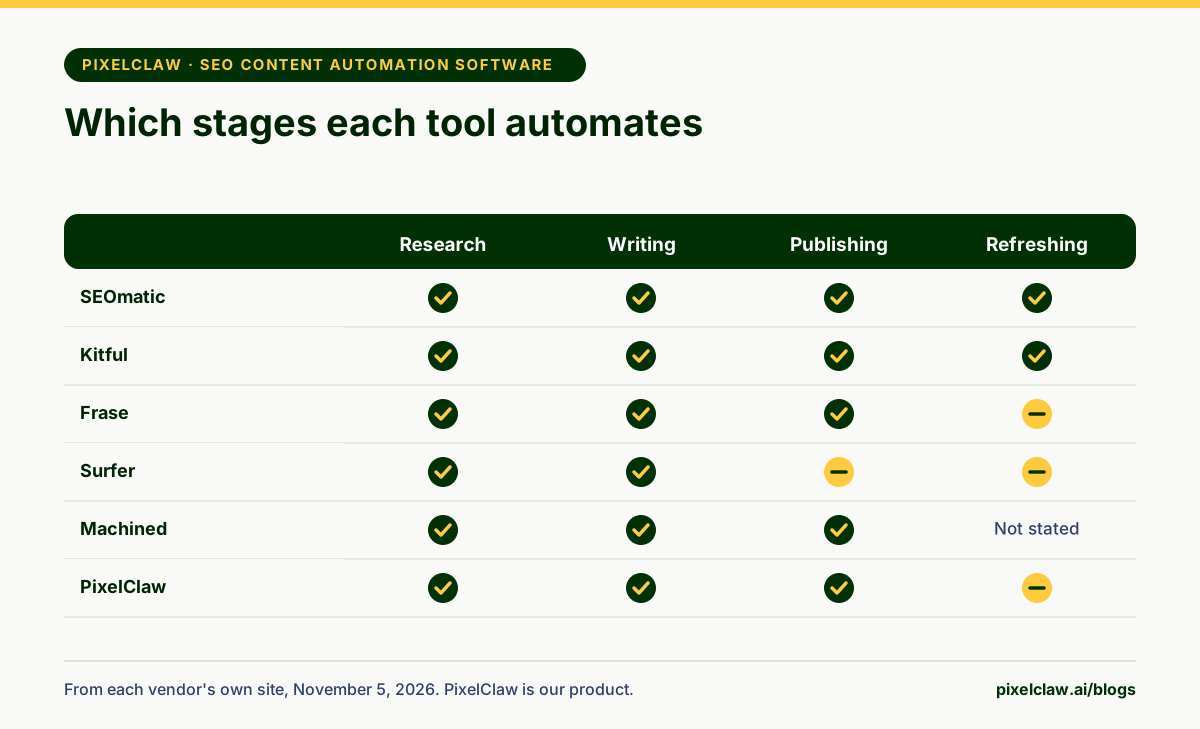
SEO content automation software takes over some or all of the steps between a keyword and a ranking page: research, writing, publishing and refreshing. SEOmatic and Kitful automate the most steps on a CMS you already run, Frase and Surfer automate research and optimization, and PixelClaw automates research to publishing on a blog it hosts.
The stages of content SEO, and which ones software automates
Every piece of content SEO goes through the same stages. Someone researches what to write and what already ranks. Someone writes and optimizes the article. Someone publishes it with the technical details right. Months later, someone notices it slipping and refreshes it. SEO content automation software promises to take some of that work away, and the honest way to compare tools is by which stages they actually take.
We read each vendor's own site on November 5, 2026 and mapped what it automates. PixelClaw is our product, so weigh its row with that in mind. A "partly" means the tool helps with that stage but a person still does most of it.
SEOmatic: automation that starts from Search Console
SEOmatic works backwards from your data. It reads Search Console, builds a ranked action plan, then its agents make the fixes and publish pages to your CMS, from a single post to hundreds of landing pages, and report the measured effect. It publishes to a long list of platforms, including WordPress, Shopify, Webflow, Framer, HubSpot, Ghost and Next.js sites.
It is supervised by default: in its own words, undoable fixes ship and the rest waits, and an approval mode makes every change wait. Launch is $99 a month for one site, Scale $249 for five sites with page templates, and there is a 14-day trial for $1 and a small free plan.
Watch out for: its own site says rankings can take weeks to follow, so judge it over a quarter, not a week.
Kitful: research, write, publish, then fix what slips
Kitful covers the full loop for a site on WordPress, Ghost, Shopify or Framer. It researches topics against the live web, writes in a brand voice trained on your posts or files, adds images, publishes on a schedule such as one article a day, and then uses Search Console data to improve pages that slip.
Starter is $39 a month for 250 credits, which its site says is up to 10 articles, on one site; Pro is $79 for 750 credits and unlimited sites. An article costs 20 credits plus a few per image, and extra credits cost $0.15 each.
Watch out for: the Starter plan is limited to one site.
Frase and Surfer: automated research and optimization
Frase builds articles from the pages that rank, scores them for SEO and for AI search, tracks AI visibility, and has an agent that can publish on its own to WordPress, Webflow, Sanity, Wix or its own CMS. Starter is $49 a month, or $39 billed yearly, for 10 articles and 50 audit pages a month, with a 7-day trial and no card.
Surfer is the best-known content editor, now with AI writing and AI search visibility tracking. Discovery starts at $49 a month billed yearly; higher plans add rank drop detection and prompt tracking. It connects to WordPress, Google Docs, Contentful and Zapier rather than running your publishing.
Watch out for: both automate the analysis better than the publishing. Plan who presses publish and who watches older pages.
Machined and SEObot: volume on a schedule
Machined researches keywords, groups them into clusters, writes researched articles and links them together before publishing to your CMS, from $19 a month for 30 articles. SEObot onboards from your website, plans content and publishes it every week, from $49 a month for 9 articles up to $1,050 for 300, in 50 languages.
Both automate research, writing and publishing well. Neither states on its pricing page that it refreshes older posts for you, so that stage stays with you or another tool.
Watch out for: Machined does not refund a charged subscription, and SEObot's own FAQ says quality varies compared with human writers.
PixelClaw: research to publishing on a blog it hosts
PixelClaw automates from the keyword to the live page. It reads the ranking pages and the questions readers ask, plans an outline, writes in your brand voice, adds a hero image with alt text and scores the post out of 100 across SEO, AEO, AIO, GEO and SXO. Posts below 60 cannot publish. Autopilot writes from a queue on your schedule, holds finished posts for approval by default and, in publish mode, lets only posts scoring 77 or more go live on their own.
Publishing needs no setup, because PixelClaw hosts the blog with its sitemap, robots.txt, llms.txt and structured data, and tells search engines about new posts. For refreshing, Search Console sync shows which posts are losing readers, and Improve post rewrites one in a click. The free plan includes enough credits for two posts; Starter is $49.99 a month.
Watch out for: it does not publish into WordPress or another CMS.
Choosing SEO content automation software
Start with the stage that costs you the most time. If research and briefs eat your week, Frase or Surfer pay for themselves. If writing and publishing are the bottleneck on a CMS you already run, look at Kitful, Machined or SEObot. If your problem is pages that rank and then fade, SEOmatic and Kitful are built around that. If you want the whole pipeline without running a CMS, PixelClaw.
Whatever you pick, keep two human jobs: choosing topics that matter to the business, and a check before publishing, whether that is a person or a score you trust. Google's guidance on helpful, people-first content applies however the content was made. For a step-by-step setup, read how to automate blog content, and for team buying criteria, SEO article generation software.
- Content SEO runs in stages: research, writing, publishing and refreshing. Few tools automate all of them.
- SEOmatic starts from your Search Console data and publishes approved fixes and pages to your CMS.
- Kitful researches, writes, publishes on a schedule and revisits pages that slip, from $39 a month.
- Frase and Surfer are strongest at research and optimization; publishing and refreshing stay partly with you.
- PixelClaw automates research to publishing on a hosted blog and flags posts that are losing readers.
Frequently Asked Questions
What is SEO content automation software?+
Software that takes over the repeatable work of content SEO: finding topics, researching what ranks, writing, optimizing, publishing and refreshing. Most tools automate a few of those steps; a few automate nearly all of them.
Can SEO content be fully automated?+
The steps can be; the judgment cannot. Tools can research, write and publish on a schedule, but someone still decides which topics matter to the business, sets a sensible pace and checks posts that make claims. The safest setups automate the work and keep a check before publishing.
Does Google penalize automated SEO content?+
Google ranks content on how useful it is, not on how it was made. Its spam policies target content produced at scale mainly to manipulate rankings. Automated content that answers real questions, published at a sensible pace, is treated like any other content.
Which SEO content automation software works with WordPress?+
SEOmatic, Kitful, Frase, Machined, SEObot and Surfer all list WordPress publishing or an integration on their own sites. PixelClaw hosts the blog itself, on its own address or your domain, and does not publish into WordPress.
Sources
- SEOmatic — SEOmatic (Read November 5, 2026.)
- Kitful pricing — Kitful (Read November 5, 2026.)
- Frase pricing — Frase (Read November 5, 2026.)
- Surfer pricing — Surfer (Read November 5, 2026.)
- Machined pricing — Machined (Read November 5, 2026.)
- SEObot pricing (help center) — SEObot (Read November 5, 2026.)
- Creating helpful, reliable, people-first content — Google Search Central
Built & scored using PixelClaw.ai
More from this blog
Continue exploring autoblogging architecture, AI blog writing, and SEO / AEO / GEO playbooks.

How to Automate Blog Content Without Losing What Makes It Yours
Which steps of blogging to automate, which to keep human, and how to set up topic discovery, research, drafting, publishing and indexing so the blog runs while the judgment stays yours.
PixelClaw Editorial Team
Product and search team

SEO Article Generation Software: A Buyer's Checklist for Teams and Agencies
Choosing SEO article generation software for a team or agency is a procurement decision. The criteria that matter, and how eight tools compare on seats, sites, approvals, API access and price.
PixelClaw Editorial Team
Product and search team
Best Autoblogging Tools in 2026: Hosted, WordPress and Agent Options Compared
Autoblogging tools come in three shapes: a hosted blog that writes itself, a writer that auto-posts to your WordPress site, and an SEO agent that runs everything. Seven tools compared, with prices from each vendor's site.
PixelClaw Editorial Team
Product and search team