Tool comparison
Tool comparisonBest AI SEO Writing Tools That Grade Your Draft Before Google Does
Seven AI SEO writing tools that check a draft before it goes live, compared on what they grade: terms and topics, structure, answer-engine readiness or AI visibility.
On this page▸
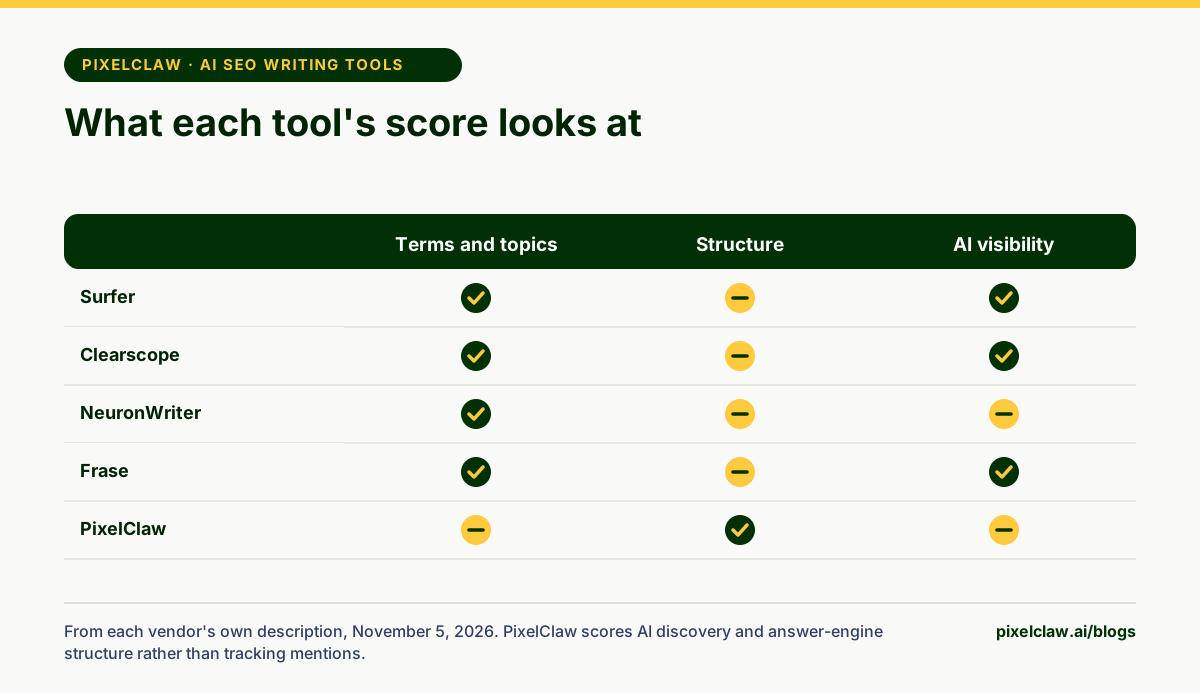
The best AI SEO writing tools grade a draft before it goes live, but they grade different things. Surfer, Clearscope and NeuronWriter compare your terms and topics with top-ranking pages; MarketMuse focuses on topic depth; Dashword on briefs and monitoring; Frase on SEO and GEO; PixelClaw on structure across SEO, AEO, AIO, GEO and SXO.
What AI SEO writing tools actually grade
Every AI SEO writing tool gives your draft a number, and it is tempting to treat them as interchangeable. They are not. Some compare the words and topics in your draft with the pages that rank. Some measure how deeply you cover a subject. Some check structure: the opening answer, headings, links, schema. Some now track whether AI assistants mention you.
Knowing what a score measures tells you what it will catch and what it will miss. We compared seven tools on that basis. PixelClaw is our product; every other fact comes from the vendor's own site, read on November 5, 2026.
| Tool | Grades mainly | Starts at (own site) |
|---|---|---|
| Surfer | Terms and topics against top pages; AI visibility | See its pricing page |
| Clearscope | Terms, topics and AI visibility | $129 a month |
| NeuronWriter | Terms and topics | $23 a month |
| MarketMuse | Topic depth and strategy | Free plan; paid by demo |
| Dashword | Brief coverage and monitoring | $99 a month |
| Frase | SEO and GEO scores | $49 a month ($39 billed yearly) |
| PixelClaw | Structure in five areas: SEO, AEO, AIO, GEO, SXO | Free; Starter $49.99 a month |
Surfer: the best-known content editor
Surfer's content editor compares your draft with the pages that rank and suggests terms, headings and length. It has added AI visibility tracking, internal linking, a coverage-gap view, plagiarism checks and rank-drop detection, and works with WordPress and Google Docs.
Its pricing page lists several annual-billed plans; the figures did not read cleanly when we checked on November 5, 2026, so look there for the current numbers.
Watch out for: chasing a perfect term score can make writing stiff; treat suggestions as a checklist, not a quota.
Clearscope: term coverage plus AI query tracking
Clearscope grades drafts on term and topic coverage and has added tracking of queries in ChatGPT and Gemini, brand visibility tracking and intent-driven recommendations. Its plans include unlimited users and projects.
Its pricing starts at $129 a month for Essentials, with Business at $399 and a 14-day free trial.
Watch out for: it is priced for teams; a solo blogger will pay for capacity they don't use.
NeuronWriter: term-based grading on a budget
NeuronWriter's editor grades drafts against top-ranking pages, with a content planner, AI templates and Search Console integration. Higher plans add plagiarism checks, your own OpenAI key and API and MCP access.
Its pricing starts at $23 a month, with a 7-day trial.
Watch out for: projects and documents are capped per plan, so count your monthly posts first.
MarketMuse: topic depth and strategy
MarketMuse grades how thoroughly you cover a topic and plans content strategy around it, with a topic navigator, SERP analysis, heatmaps of your site's coverage and article briefs.
Its pricing page shows a free plan with one user and ten queries a month; paid plans are quoted after a demo.
Watch out for: it is a strategy tool first; drafting and publishing happen elsewhere.
Dashword: briefs, scoring and monitoring
Dashword builds briefs from the pages that rank, scores drafts in real time, and monitors published content with traffic alerts and keyword reports. It has an AI writer, a Google Docs add-on, and API and MCP access on every plan.
Its pricing starts at $99 a month for 30 content reports and five seats; the first report is free.
Watch out for: it does not publish to a CMS; we compare it with PixelClaw in Dashword alternatives.
Frase: SEO and GEO scores in one place
Frase scores drafts for both SEO and GEO, tracks AI visibility, monitors decaying content and can publish on its own to WordPress, Webflow, Sanity and Wix.
Its pricing starts at $49 a month, or $39 billed yearly, with a 7-day trial and no card.
Watch out for: its article allowances are modest at the lower tiers.
PixelClaw: structure graded in five areas, with fixes
PixelClaw's score is built around structure: whether a post has what search engines, answer engines, trust signals, AI discovery and readers need. It checks keyword placement and lengths, the opening answer, FAQ and takeaways, author and sources, AI crawler access, image descriptions, a contents list and a call to action, then rolls them into one number out of 100. Thirteen one-click fixes write the missing pieces, and a post under 60 cannot publish without a recorded override.
It is not a term-frequency tool; if you need that, pair it with one of the editors above. The free plan scores every post. For the full workings, read the content optimization tool.
How to use a content score without writing for the score
Every one of these tools can be misused the same way: chasing the number until the writing gets worse. A post stuffed with suggested terms, or padded to hit a length, can score higher and read badly.
Use the score as a list of questions instead. When a term-based editor says a topic is missing, ask whether readers need it. When a structure check says the opening answer is too long, ask whether the first paragraph actually answers the question. Fix what improves the post for a reader, ignore what doesn't, and accept a slightly lower number when the writing is better for it.
- Before buying an AI SEO writing tool, check what its score measures: terms, topics, structure or AI visibility.
- Surfer, Clearscope and NeuronWriter compare your draft's terms and topics with the pages that rank.
- MarketMuse is strongest on topic depth and content strategy.
- Dashword and Frase add briefs, monitoring and AI visibility to the grading.
- PixelClaw grades structure in five areas and fixes most failures in one click.
Frequently Asked Questions
Does a high content score guarantee rankings?+
No tool's score does. Scores measure how closely a draft matches patterns in pages that rank, or how well it is structured. Rankings also depend on competition, your site's authority and whether the post answers the question better.
Can I use two SEO writing tools together?+
Yes, and many teams do: one for term and topic coverage, such as Surfer or Clearscope, and one for structure and publishing, such as PixelClaw. They check different things, so they rarely conflict.
Which SEO writing tool is best for AI search?+
Tools that check answer-engine structure or track AI visibility. Clearscope, Frase and Surfer now track AI visibility; PixelClaw scores every draft for answer engines and AI discovery alongside classic SEO.
Is there a free AI SEO writing tool?+
MarketMuse has a free plan with ten queries a month, Dashword's first report is free, and PixelClaw's free plan scores every post and includes two complete AI posts.
Sources
- Clearscope pricing — Clearscope (Read November 5, 2026.)
- Surfer pricing — Surfer (Read November 5, 2026.)
- NeuronWriter pricing — NeuronWriter (Read November 5, 2026.)
- MarketMuse pricing — MarketMuse (Read November 5, 2026.)
- Dashword pricing — Dashword (Read November 5, 2026.)
- Frase pricing — Frase (Read November 5, 2026.)
Built & scored using PixelClaw.ai
More from this blog
Continue exploring autoblogging architecture, AI blog writing, and SEO / AEO / GEO playbooks.

A Content Optimization Tool That Scores SEO, AEO, AIO, GEO and SXO Together
Most content optimization tools grade one thing: keywords. PixelClaw scores every post in five areas, explains each failed check in plain words, and fixes most of them in one click.
PixelClaw Editorial Team
Product and search team

Best AI SEO Content Writing Tools, From Brief to Published Post
SEO content has four stages: brief, draft, optimize and publish. Eight AI SEO content writing tools compared on which stages they cover, what they cost and where the gaps are.
PixelClaw Editorial Team
Product and search team

SEO Writing Software That Checks Every Post Before It Goes Live
What to expect from SEO writing software in 2026, from the editor to the checks and the publish step, and how PixelClaw's writing studio handles each part.
PixelClaw Editorial Team
Product and search team